Skip to content
eCTD

eCTD for Bosnia and Herzegovina

Prepare eCTD submissions with less manual work.

Organise documents, manage sequences, check technical rules and prepare a structured XML/ZIP package — in one clear web workspace.

Or write to us at info@ectd.app

Every sequence ends in a structured package
  • index.xml
  • ba-regional.xml
  • index-md5.txt
  • ZIP
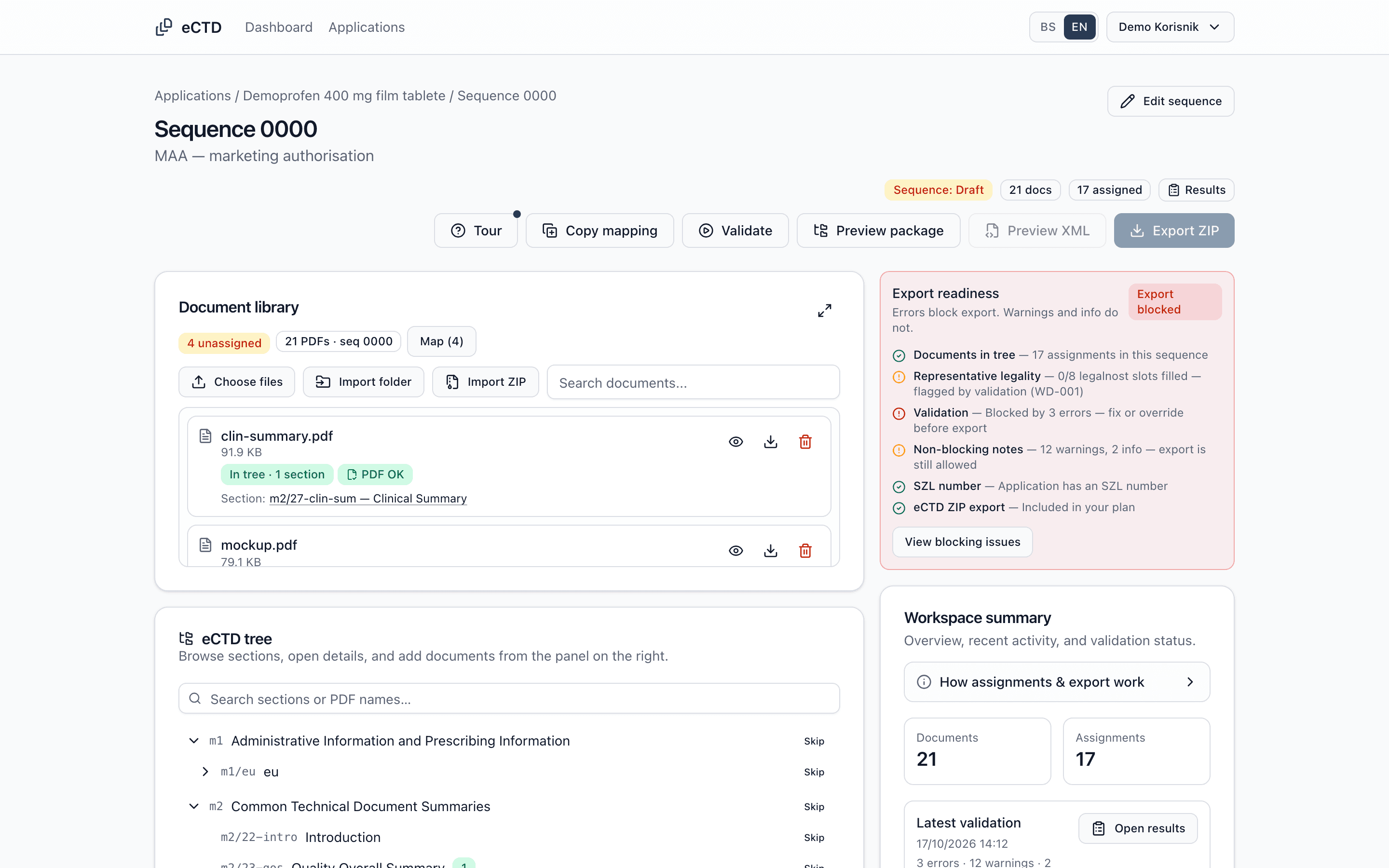
The eCTD Sequence Workspace for demo sequence 0000 with 17 assigned PDFs, the document library, the eCTD tree and an export readiness checklist reporting three blocking errors.
Sequence Workspace: document library, eCTD tree and export readiness in one view. Shown with fictional demo data.

Why eCTD

Less time on folder structure. More time on the dossier.

The technical side of preparing a sequence — mapping, naming, lifecycle and XML — becomes one guided workflow.

  • Area
    Mapping
    By hand
    PDF by PDF, folder by folder
    With eCTD
    Many documents at once, in a single table
  • Area
    File names
    By hand
    Checking naming rules by hand
    With eCTD
    Names adjusted to the rules on upload
  • Area
    Sequences
    By hand
    Separate spreadsheets to track what went where
    With eCTD
    A sequence lifecycle timeline and lifecycle operations per document
  • Area
    Technical checks
    By hand
    Errors found only after submission
    With eCTD
    Selected rules checked before export
  • Area
    XML
    By hand
    Editing backbone files by hand
    With eCTD
    index.xml and ba-regional.xml generated automatically

How it works

Four steps to a sequence package.

  1. Step 01

    Create an application

    Product and procedure details; the profile sets the relevant sections.

  2. Step 02

    Map documents

    Upload one by one, in bulk or as an existing eCTD folder.

  3. Step 03

    Validate

    Findings by severity, with a pointer to where to fix them.

  4. Step 04

    Export

    XML backbone and ZIP package, ready to download.

Document mapping

From a pile of PDFs to a complete eCTD tree.

The document library, eCTD tree and assignment details sit side by side, so you always see what is mapped and what is still missing.

  • Bulk upload and mapping table

    Upload many documents at once and review the mapping before confirming.

  • Required sections at a glance

    The application profile marks what is required, so you work from a list, not from memory.

  • Copy from the previous sequence

    For renewals and variations, carry over existing mapping and working documents.
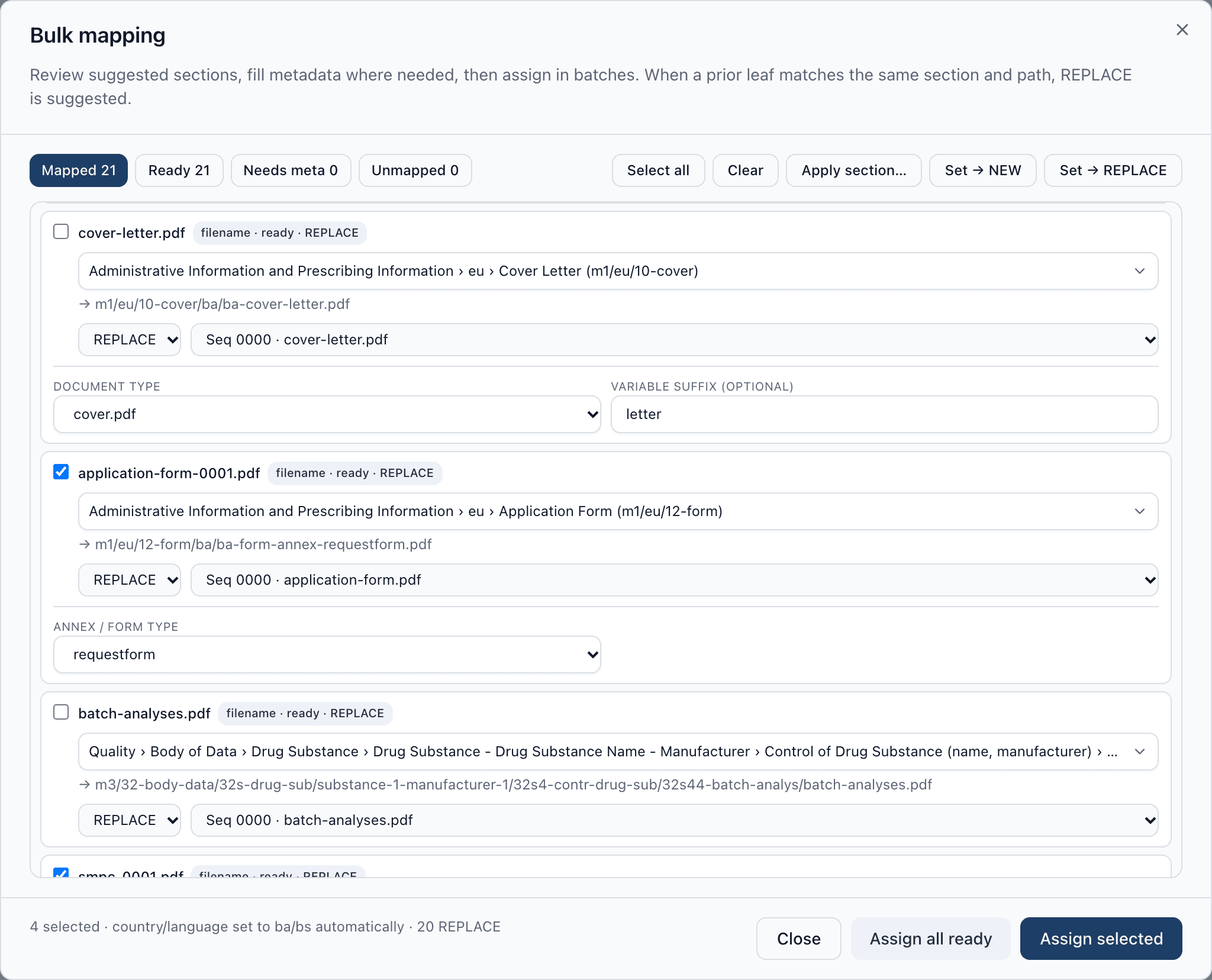
The eCTD bulk mapping dialog: each document has a target eCTD section, a file path and a REPLACE lifecycle operation with the selected previous document from sequence 0000.
Bulk mapping for a variation: new document versions with a suggested section and REPLACE of the previous document from sequence 0000. Demo data.

Validation and export

Fix technical errors before export, not after submission.

Validation runs selected naming, structure, checksum and PDF rules. When no blocking errors remain, export generates the complete sequence package.

  • Findings by severity and category

    Error, Warning and Info with filters — fix what blocks the export first.

  • Straight to the fix

    For most findings, Fix takes you to the related screen or document so you can correct it there.

  • A package with its report

    The ZIP contains the generated XML, MD5 checksums and the util folder, with an HTML validation report alongside the sequence.
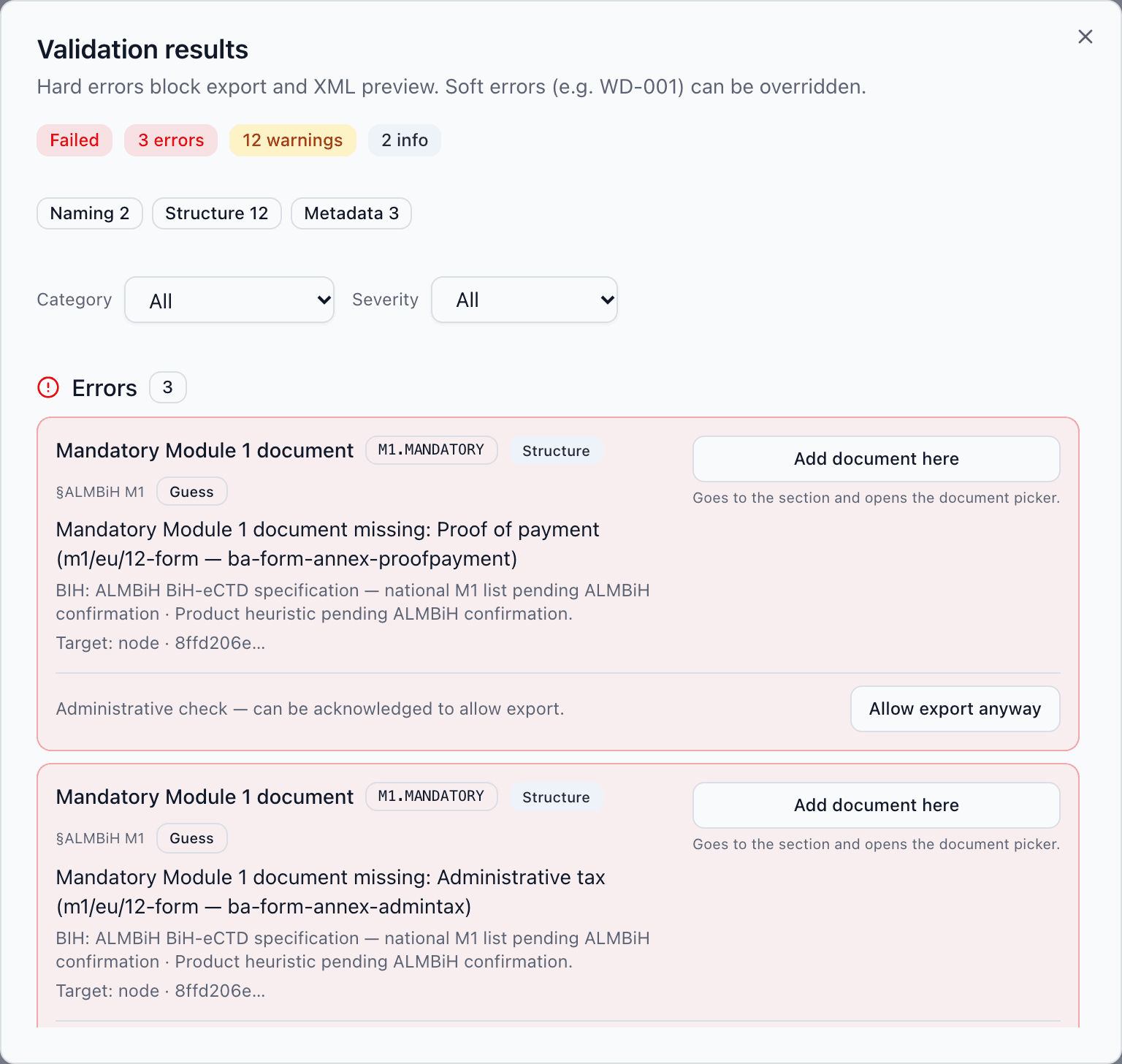
eCTD validation results for a demo sequence: three errors, twelve warnings and two info findings, with category and severity filters and an action for each finding.
Validation overview: findings by severity and category, with the rule source and a fix action. Demo data.
Exported package structure
SZL-<number>/
├── 0000/
│   ├── index.xml
│   ├── index-md5.txt
│   ├── m1/eu/
│   │   └── ba-regional.xml
│   ├── m2/ … m5/
│   └── util/dtd/, util/style/
├── 0000-validationreport/
│   └── validation-report.html
└── 0000-workingdocuments/

Example structure. The SZL number and sequence number come from the application. ZIP export availability depends on the subscription plan.

Included

And everything else a dossier needs.

The capabilities behind mapping, validation and export — available in the application today.

  • Applications and profile

    Product data, procedure type, SZL number and a profile that tailors the eCTD tree.

  • Sequences and envelope

    Sequences 0000, 0001 and onwards, with envelope data and related sequences.

  • Lifecycle operations

    New, replace, delete and append, with prior-document selection.

  • Working documents

    Legal-status evidence and editable product information in a separate package folder.

  • Existing package import

    An existing eCTD ZIP becomes the starting point, with lifecycle and envelope data.

  • Activity log

    Important actions are recorded: recent activity in the sequence workspace, the full audit log for administrators.

Solutions

For in-house teams and for consultants.

Pharmaceutical companies

For regulatory teams managing their own dossiers.

  • All of the company's applications and sequences in one place
  • A clear view of what was submitted in each sequence
  • Reuse of mappings for renewals and variations

Regulatory consultants

For consultants and agencies working for several clients.

  • Several companies from a single user account
  • Data kept separate per client company
  • The same repeatable workflow for every dossier

Compliance

Focused on BiH eCTD requirements — with clear limits.

eCTD is built around the ALMBiH eCTD specification and the EU M1 regional structure it is based on. We want to be precise about what the tool does and what it does not.

eCTD is not an official ALMBiH tool and is not certified or endorsed by any regulatory authority. Passing validation in the tool does not guarantee that a submission will be accepted. Responsibility for the content and correctness of a submission remains with the applicant.

What the tool covers

  • The BiH eCTD folder structure: EU M1 regional module and ICH Modules 2–5
  • XML backbone per the ICH eCTD v3.2.2 DTD and the BiH regional XML (ba-regional.xml)
  • Selected technical rules from the EU M1 validation criteria (v8.2) and BiH naming and structure rules
  • PDF technical checks: version, size, encryption and JavaScript, bookmarks and fonts, plus warnings for external links, searchable text, linearisation and attachments

What the tool does not do

  • It does not submit to ALMBiH — you download the package and submit it through the official channels.
  • It does not assess the scientific or regulatory content of documents.
  • It does not cover every possible validation rule; some BiH requirements await confirmation and do not hard-block export.
  • It does not support Study Tagging Files (STF) or eCTD v4.0.

Demo

See the application on an example from your own work.

We will walk through the workflow from creating an application to exporting the package and answer questions about your submissions.

What to expect

  • A live walkthrough tailored to the submissions you prepare
  • A conversation about your current document preparation process
  • Answers about the BiH eCTD structure and the tool's limitations

Prefer to write directly?

info@ectd.app

Demo request

Fields marked with an asterisk (*) are required.

Optional — e.g. submission types, number of applications or questions you have.

We email the details from this form to info@ectd.app through Resend and use them only to reply. The site does not write them to a database. The message stays in that mailbox until someone deletes it by hand. We do not use it for marketing. To access or delete your details, write to info@ectd.app. Privacy policy